

Yes, a smartphone can measure decibels well enough for screening and hearing protection decisions, if you use a validated app and follow a consistent technique. It is not a substitute for a calibrated sound level meter in regulated occupational settings. For parents checking whether a concert, playground, or fireworks show is too loud for a child’s ears, a properly used phone app gets you close enough to act on. The workflow below shows exactly how to get a reading you can trust.
TL;DR:
- Smartphone decibel measurements are sufficiently accurate for parental screening and hearing protection decisions when using a validated app and proper technique.
- iOS devices tend to measure within ±2 dBA of professional sound level meters, while Android measurements often degrade above 85 dB due to hardware variability.
- External calibrated microphones can significantly improve smartphone measurement accuracy, approaching professional compliance standards, but added cost and complexity remain.
- A-weighted LAeq readings should be used for exposure assessments, comparing them with the kids’ safe daily dose of an average 70 dBA over 24 hours (85 dBA is the adult workplace action level), with louder sound calling for hearing protection, especially for children.
- Repeated measurements and careful setup are essential to ensure consistent, reliable data, and professional assessment is recommended for occupational or legal purposes.
Table of Contents
- How Do You Measure Decibels With Your Phone?
- How Accurate Are Decibel Apps, Really?
- Should You Calibrate Your Phone’s Decibel Meter?
- What Do dB Readings Actually Mean for Hearing Safety?
- Why Do Repeated Measurements Disagree With Each Other?
- Where BANZ Fits Into Your Noise-Monitoring Routine
- What Other Errors Should You Watch For?
- A Parent’s Checklist for Everyday Noise Screening
- Ready to Protect What You Just Measured?
- Sources
How Do You Measure Decibels With Your Phone?
Getting a usable reading takes about a minute of setup and thirty to sixty seconds of measuring. The steps matter more than the app you pick, though app choice matters too.
- Choose an app that supports A-weighting and reports LAeq. A-weighting filters sound the way the human ear perceives it, and LAeq gives you an energy-averaged level over time rather than a single erratic spike. Skip apps that only show a peak number with no averaging option.
- Turn on A-weighting in the settings before you start. Some apps default to C-weighting or unweighted (Z) measurements, which will throw off your comparison to safety thresholds.
- Position the phone at ear height, with the microphone facing the noise source. Holding it at your hip or in a pocket skews the reading low.
- Remove the phone case and any screen protector overlapping the mic port. Cases muffle sound and can shave several decibels off your reading without you noticing.
- Mount the phone on something steady, or hold it as still as possible. A tripod or even a stack of books beats a shaky hand, since handling noise and micro-movements introduce false spikes.
- Measure for 30 to 60 seconds minimum. Short samples miss the natural rise and fall of most environments and give you a misleading snapshot.
- Record LAeq, max, and peak values, then repeat the measurement once. If your two readings land within a couple of decibels of each other, you have a reliable number. If they swing wildly, something in your setup needs fixing.
- Log the time, location, and conditions if you’re comparing places or times of day. A daycare pickup line at 3 p.m. and a backyard party at 8 p.m. are not comparable without that context.
Pro Tip: Run your first few measurements next to a known quiet moment, like an empty room, so you can sanity-check your baseline before trusting readings in louder environments.
One detail worth remembering when picking an app: polish and star ratings don’t predict accuracy. A peer-reviewed comparison found some of the best-reviewed, best-designed apps measured less accurately than plainer ones built specifically for noise monitoring. Choose based on validation data, not app store aesthetics.
How Accurate Are Decibel Apps, Really?
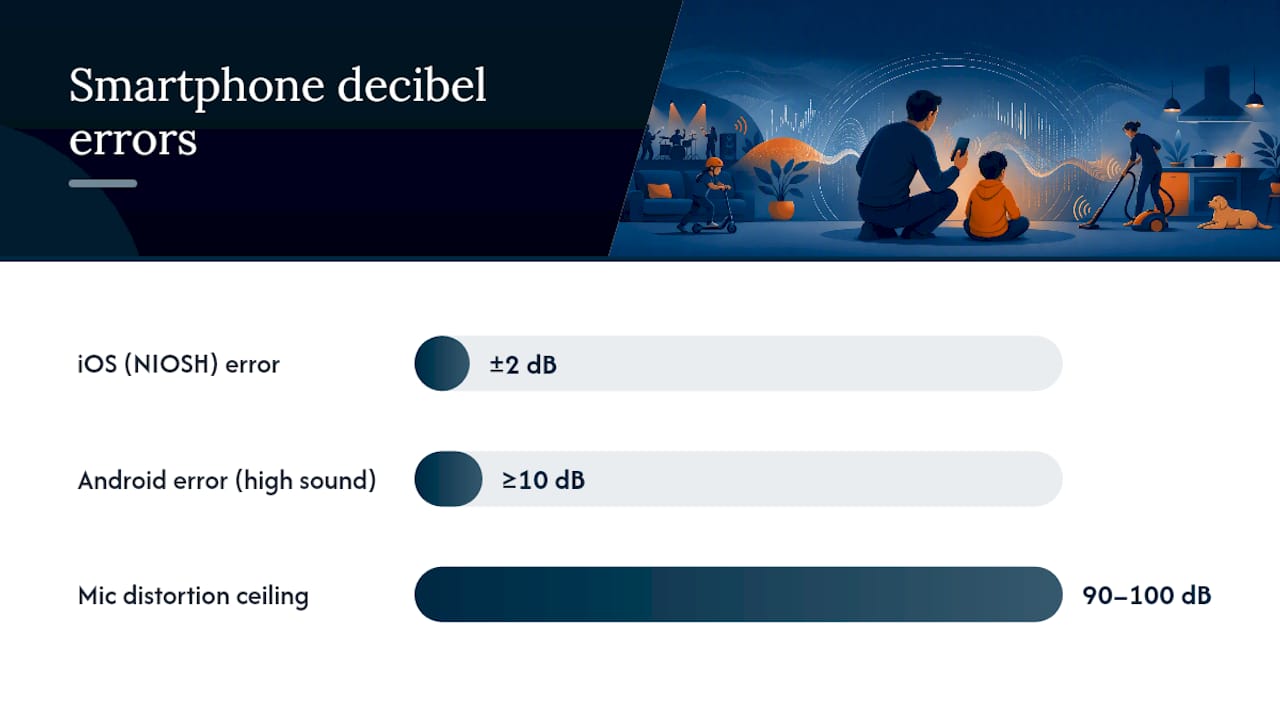
The accuracy answer depends heavily on your phone’s operating system and how loud the environment gets. On iOS, the picture is genuinely encouraging. NIOSH tested its own Sound Level Meter app and found it measures within ±2 dBA of a professional reference under lab conditions, largely because Apple’s consistent hardware across iPhone models makes that kind of validation possible. A separate peer-reviewed evaluation confirmed the NIOSH app held the best agreement with a calibrated sound level meter across the 40 to 85 dB(A) range, in both lab and real-world testing.
Android tells a messier story. Because thousands of different handsets run Android, with different microphones and audio processing chips, no single app can be validated the way NIOSH validated its iOS tool. That fragmentation isn’t a flaw in any one app. It’s a hardware problem nobody can engineer around from the software side.
Statistic Callout: An evaluation of Android noise apps found accuracy holds up reasonably well at low levels (25 to 40 dB) but degrades as sound increases, with some apps deviating by 10 dB or more above roughly 85 dB.
A 10-decibel error at exactly the range where hearing damage becomes a real concern is not a small margin. It’s the difference between “this is fine” and “get your child out of there.”
Several forces drive this decline:
- MEMS microphones are built for speech, not accurate measurement. The tiny microphones in every smartphone were optimized for voice calls and video chat, not for capturing the full range of a fireworks display or a stadium crowd.
- Many phones hit a hardware ceiling above roughly 90 to 100 dB. Past that point, the microphone itself starts distorting the signal.
- Phone age and model matter more than most people expect. A microphone that’s been through years of pocket dust and a phone case is not the same instrument it was on day one.
- Automatic processing built into the phone’s OS can quietly interfere. Noise reduction and gain adjustment, both designed to make calls sound clearer, work against raw measurement accuracy.
The practical takeaway is straightforward: treat your phone as a screening tool. It tells you whether an environment is probably fine, probably concerning, or definitely needs real attention. For anything approaching a regulated decision, a workplace exposure claim, or a serious question about a child’s repeated exposure, step up to an external calibrated microphone or a professional sound level meter.
Should You Calibrate Your Phone’s Decibel Meter?
Calibration is the single biggest lever you have for closing the gap between a phone reading and a professional one. You have two real options here.
In-app calibration exists in some apps and lets you offset the reading against a known reference tone or a secondary calibrated device. It helps, but it can only correct for consistent bias. It can’t fix a microphone that behaves differently at different volumes.
An external calibrated microphone is the more serious upgrade, and the data backs it up. Laboratory calibration testing found that pairing a phone app with an external, calibrated microphone can bring the whole system close to Class 2 IEC/ANSI compliance, the same tier used in a lot of professional occupational monitoring. That’s a meaningful jump from relying on the phone’s built-in hardware alone.
If you’re shopping for an external mic, a few things actually matter:
- Check the connector type. External microphones connect through TRRS, USB-C, or Lightning, and you need one that matches your phone’s port.
- Look for explicit Class 2 or Type 2 compliance listed on the product. Vague marketing language like “professional grade” without a stated class rating usually means it isn’t independently rated.
- Confirm the mic ships with or supports a calibration certificate or reference tone. Without that, you’re still guessing at your baseline.
- Verify the app you’re using actually supports external mic input. Not every noise app recognizes a plugged-in microphone by default.
To connect and check calibration, plug in the mic, select it as the audio input inside your chosen app, and run a known reference tone (many calibrators include one) to confirm the reading matches. Do this before you rely on the setup for anything important.
Pro Tip: If you only need occasional high-confidence readings, renting a professional sound level meter for a single event costs far less than buying calibration gear you’ll use twice a year.
The trade-off is straightforward: external mics add cost and one more thing to carry, but they can reduce inter-device variability to close to ±1 dB in controlled setups. If you’re dealing with a genuine occupational noise complaint or need documentation that will hold up to scrutiny, hiring a professional with a proper sound level meter is still the more defensible choice.
What Do dB Readings Actually Mean for Hearing Safety?
A number on a screen only helps if you know what to do with it. Two concepts do most of the work here: A-weighting and the exchange rate.
A-weighting, shown as dB(A), adjusts raw sound pressure to match how the human ear actually perceives different frequencies. It’s the correct metric for hearing risk, which is why every app recommendation in this article assumes A-weighting is turned on. LAeq is the energy-averaged level over your measurement window, the number you should use for exposure decisions. Peak is the single loudest instant captured, useful for spotting impulse noise like a starter pistol or a slammed door, but not what you use to judge sustained exposure.
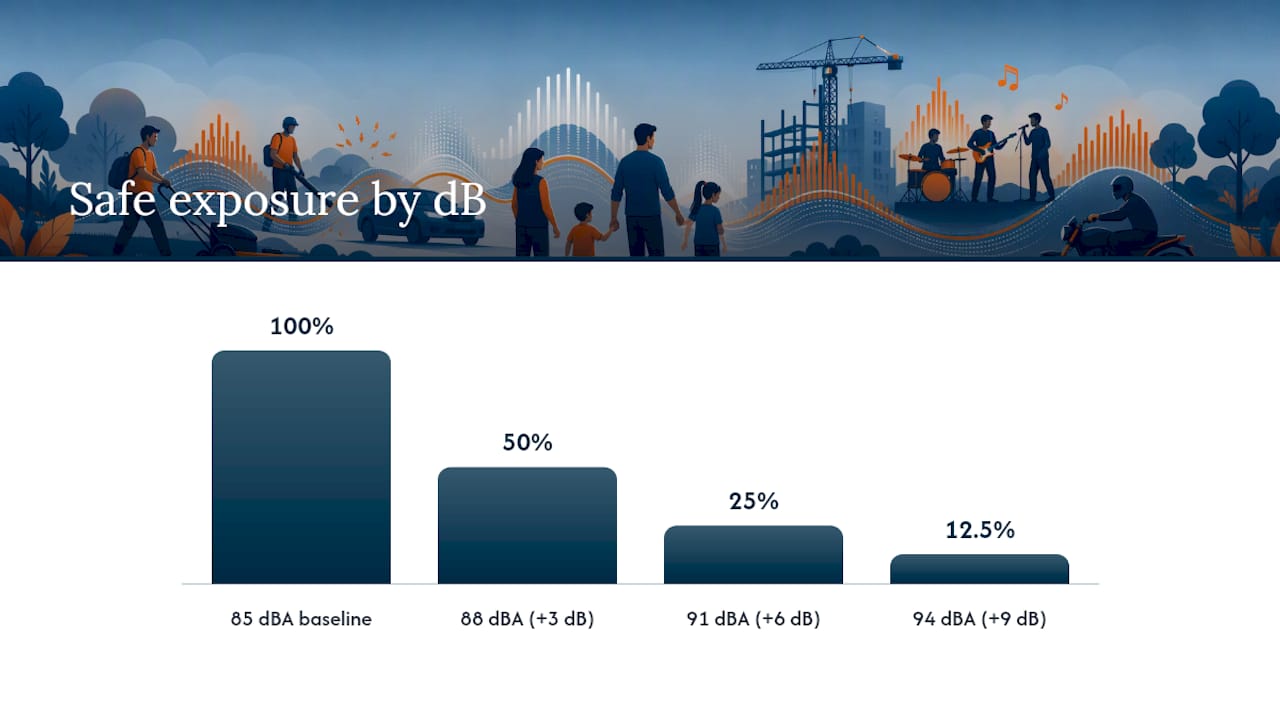
Occupational and public health guidance sets 85 dBA as the adult workplace action threshold where sustained exposure starts posing a real risk to hearing. For kids, the safe daily dose is lower: an average of 70 dBA over 24 hours (or 75 dBA over an 8-hour exposure). The 3 dB exchange rule matters just as much: every 3 dB increase cuts the safe exposure time roughly in half.
For hearing protection, the Noise Reduction Rating (NRR) on earmuffs tells you the maximum decibel reduction under ideal lab conditions. Real-world attenuation usually runs lower than the printed number, so a rule of thumb for parents: subtract a few decibels from the stated NRR when estimating actual protection, and pick earmuffs rated for the loudest environment your child regularly encounters, not just the average one.
When documenting a reading for follow-up, whether that’s a pediatrician conversation or a workplace concern, record more than just the number: time, location, LAeq, weighting used, phone model, app name and version, and whether an external mic was involved. That context is what makes a reading useful to anyone reviewing it later.
- 85 dBA is the adult workplace action threshold; the kids’ safe daily dose is an average of 70 dBA over 24 hours.
- Every 3 dB increase halves the safe exposure time.
- LAeq, not peak, is the number to use for ongoing exposure decisions.
- Real-world earmuff attenuation typically runs below the printed NRR.
Why Do Repeated Measurements Disagree With Each Other?
Two readings from the same spot, minutes apart, sometimes come back several decibels off from each other. That’s usually not a broken app. It’s one of a handful of predictable problems.
- Automatic gain control (AGC) is adjusting the signal in real time. Many phones apply this for calls, and it fights against a stable, accurate reading. Some apps let you disable it in settings.
- A phone case is muffling the microphone port. Take it off before measuring, every time.
- Wind noise is contaminating outdoor readings. A cheap foam windscreen on an external mic, or simply shielding the phone with your body, cuts this out.
- The sample was too short. Ten seconds catches a lull or a spike, not the real picture. Stretch it to 30 to 60 seconds.
- Another audio app is running in the background. Music, calls, or notification sounds can bleed into the measurement.
- Weighting or averaging settings got changed without you noticing. Double-check A-weighting is still selected before every session.
If two consecutive readings differ by more than 2 to 3 dB with no obvious environmental change between them, discard both and start over with a fresh setup. Consistency between repeated measurements is your best sign that the number is real, not noise from the measurement process itself.
Where BANZ Fits Into Your Noise-Monitoring Routine
A phone reading tells you there’s a problem. BANZ exists for the next step: doing something about it. The free BANZ Protect app gives parents real-time UV and noise monitoring in one place, built specifically around the everyday situations families actually run into, sports games, fireworks, concerts, and loud family gatherings.
Once you have a reliable dB reading, matching it to the right earmuff comes down to fit and NRR rating. BANZ makes hearing protection sized for different stages: Baby Hearing Protection Earmuffs for infants and toddlers, and Kids Hearing Protection Earmuffs for older children who need a secure, comfortable fit through a loud event.
Practical ways to connect your reading to a decision:
- If your app shows sustained levels well above a 70 dBA average, that’s your cue to get earmuffs on your child before, not after, the noise ramps up.
- Use the NRR vs. SNR guide to understand what the rating on any earmuff box actually promises in practice.
- If you’re unsure which product fits your situation, BANZ’s Ask-an-Expert resource is a straightforward place to get a direct answer.
None of this requires guesswork. Measure first, then protect, using gear built specifically for a child’s ear rather than a scaled-down adult earmuff that never quite fits right.
What Other Errors Should You Watch For?
A handful of mistakes show up over and over in phone-based noise measurement, beyond the setup issues already covered. Background reflections off hard surfaces, tile floors, gymnasium walls, concrete playgrounds, can artificially inflate a reading well above what a person standing there actually experiences, since sound bounces and stacks in enclosed spaces. Measuring right next to a single loud source, like standing directly beside a speaker, captures a spike that doesn’t represent the average exposure across a room.
Battery-saving modes on some phones throttle background processing in ways that can interfere with real-time audio apps, producing choppy or delayed readings. Software updates occasionally change how a phone’s operating system handles microphone gain, which is why a reading that matched a professional meter last year might drift slightly after an OS update, worth a periodic recheck if you use the same setup regularly.
The fix for most of these is the same: measure more than once, from a spot that represents where the person is actually standing (not right against a wall or speaker), and treat any single extreme reading with skepticism until a repeat measurement confirms it. When in doubt about a genuinely important decision, a workplace concern or a suspected pattern of overexposure, that’s the moment to bring in a calibrated external mic or a professional sound level meter rather than trusting a single phone reading.
A Parent’s Checklist for Everyday Noise Screening
Four steps cover almost every situation you’ll run into: measure with a validated app and correct technique, confirm with a repeat reading before trusting the number, protect your child’s hearing once levels run above a 70 dBA daily average, and document the time, place, and reading if you think you’ll need to revisit it.
That covers the vast majority of everyday parenting situations, concerts, sporting events, fireworks, loud classrooms visited outside school hours. It does not cover suspected workplace overexposure or a pattern of hearing complaints that needs real medical attention. For those, a professional sound level meter and an occupational health consultation matter more than anything a phone app can offer.
— Shari M. Murphy
Ready to Protect What You Just Measured?
A dB reading is only useful if it leads to action, and for parents that action usually means getting the right hearing protection on your child before the next loud event, not after. BANZ builds earmuffs specifically sized for young ears, including Baby Hearing Protection Earmuffs for infants and toddlers and Kids Hearing Protection Earmuffs in solid colors, plus print options for both age groups if your child prefers something more playful than plain.
For families who want sun and hearing protection covered in one purchase, the Baby Hearing Protection Earmuffs & Wrap Around Sunglasses Combo Set pairs both in a single set, useful for anyone packing for a day at an outdoor event where both loud noise and sun exposure are guaranteed. Pair whichever earmuff you choose with the free BANZ Protect app for real-time monitoring going forward, so you’re not relying on a one-off phone reading every time. Shop the current earmuff lineup and pick the fit that matches your child’s next loud day out.
Sources
- Sound Level Meter App | Noise and Hearing Loss | CDC
- Assessing the Usefulness of Mobile Apps for Noise Management in Occupational Health and Safety: Quantitative Measurement and Expert Elicitation Study
- Calibration and compliance testing of an iOS-based app plus external microphone (study excerpt)